Dell Wifi Driver For Windows 7 64 Bit Free Download
 one. Fix Dell Drivers Problems
2. How practise I know the trouble is with my Dell Drivers?
3. Download Dell Device Drivers – Automatic Driver Updates
4. How will a Commuter Update Tool Fix My Dell Drivers?
Dell Drivers need to be kept updated to keep your Dell figurer or device running well. If you need help with a Dell laptop, computer, printer or other device and then read the article beneath.
1. Gear up Dell Drivers Problems
If you are having problems with missing, decadent or outdated Dell Drivers, and then you should firstly check the manufacturers' website for any Driver updates. Drivers are updated on a regular basis and information technology is important to proceed your Drivers updated in guild to ensure your Dell devices operate at their best.
Dell Drivers download
Dell Drivers can be updated manually or automatically and both options are discussed below. If y'all need to download drivers for your Dell PC or laptop, then you can effort the Dell website for Drivers updates or yous can utilise a Driver Update Tool like DriverDownloader to automate these and all other Driver updates.
Start Download
In many cases the Drivers may exist difficult to locate or simply no longer bachelor. In these cases you lot can employ a Driver Update Tool to source and download the Drivers for you lot. A Driver Update Tool tin can exist a useful slice of software for keeping your PC, and all its' associated devices and Drivers, in good working guild.
The well-nigh common problems with Dell Drivers tend to exist either missing Dell Audio/ Audio Drivers, Dell Webcam Drivers, Dell Wireless Drivers or Dell Printer Drivers. Any device within or linked to your Dell laptop or desktop requires the right Drivers to work efficiently. If you are unsure of which Drivers may be causing the trouble, then you can download the software below and run a free Drivers Scan of your PC.
2. How do I know if the problem is with my Dell Device Drivers?
The built-in Device Managing director tool is the best manner to initially diagnose any issues. To access the Device Manager, consummate the following steps:
- Open the Command Panel
- Select System
- Click on Device Manager
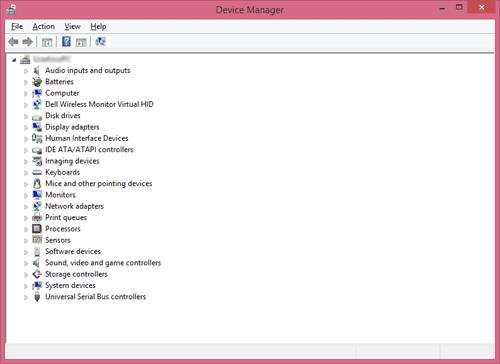
The Device Manager alerts y'all to whatsoever device issues using the exclamation indicate, yellow triangle or question mark icons beside the device with the consequence. If you lot see one of these icons next to your Dell device, so you volition need to download and install updated Dell Drivers.
If you are not using an Automatic Driver Update Tool, and then y'all will need to note the make and model of your Dell Device while in the Device Manager. You need this information when searching for the specific Dell Commuter required.
3. Dell Drivers Download – Automatic Commuter Updates
It is recommended you lot update your Dell Drivers regularly in social club to avert conflicts. Driver updates will resolve whatever driver disharmonize issues with all devices and better the operation of your PC.
IMPORTANT Notice: Updates are recommended for all Windows ten, viii, 7, Vista, XP users.
Download and installDell Drivers
How Exercise I Install Commuter updates?
To ready your Drivers issues you will demand to know the particular model of theDell device you are having problems with. Once you have the details you can search theDell website for your drivers and, if available, download and install these drivers.
How do I know if I demand to update my Drivers?
If you are unsure of whether or not y'all demand to update your Drivers, or indeed which Drivers may need to be updated, you tin can run a Drivers scan using a driver update tool (you will need to pay to annals this tool but usually the Drivers browse is free). This volition let you lot to assess your Commuter needs without any commitment. Alternatively, y'all can utilise the device manager to check if there are issues with any of your hardware devices.
Tin can I update the Drivers myself?
In many cases the respond to this is yes, however in some cases the manufacturers no longer brand the Drivers available then yous need to use a Driver Update Tool to install the missing Drivers. The purpose of such as tool is to salve y'all time and effort by automatically downloading and updating the Drivers for you.
four. How Will A Commuter Update Tool Fix My Dell Drivers ?
A Driver Update Program will instantly resolve your drivers problems past scanning your PC for outdated, missing or corrupt drivers, which it then automatically updates to the most compatible version.
Why should I download Driver Update Software?
Apart from updating your Dell Drivers, installing a Driver Update Tool gives:
- Up to 3 times faster internet connectedness and download speeds
- Better PC performance for games and audio applications
- Smooth-running of all your PC devices such as printers, scanners etc.
- Better all-round performance of your PC due to automated driver updates which will
proceed all your devices and your PC in top status
If you are having issues with Dell Sound Driver, our Ready Dell Audio Drivers Problems article may help y'all.
How to Install Dell Software Drivers : A Footstep-By-step Guide >>
Whatever Dell Drivers y'all require, whether it is for Windows 10, 8, Windows 7, XP or Vista, you lot can download our Driver Update Tool and run a free Drivers scan of your PC. This will show y'all what Dell Drivers need to be updated, you tin then register the software for automatic Commuter updates should you wish to do and then.
Common Dell Drivers Issues
Click on the button below to run a complimentary Drivers Scan. Suitable for all Dell devices and laptops such as Dell Inspiron, Dell Vostro and Dell Latitude.
Some of the well-nigh common Dell Driver downloads are:
- Dell Drivers for Windows 7 64 chip
- Dell Drivers for Windows vii 32 scrap
- Dell Drivers for Inspiron 15
- Dell Drivers for Windows vii
- Dell Latitude e5470 Windows ten Drivers
Start Download
DOWNLOAD HERE
Posted by: moorethereatend.blogspot.com